Instant digital delivery · Secure Stripe & Etsy checkout · One-time purchase

ProFormaGRID

Training Compliance Command Center

Training status for every site, team and manager

Give each role and site a requirement profile, add your people and log every completion. The workbook works out the status of every required course for every person, shows compliance by site, department and manager, lists what each manager needs to act on and keeps sessions, exemptions and retraining in the same file.

Edition

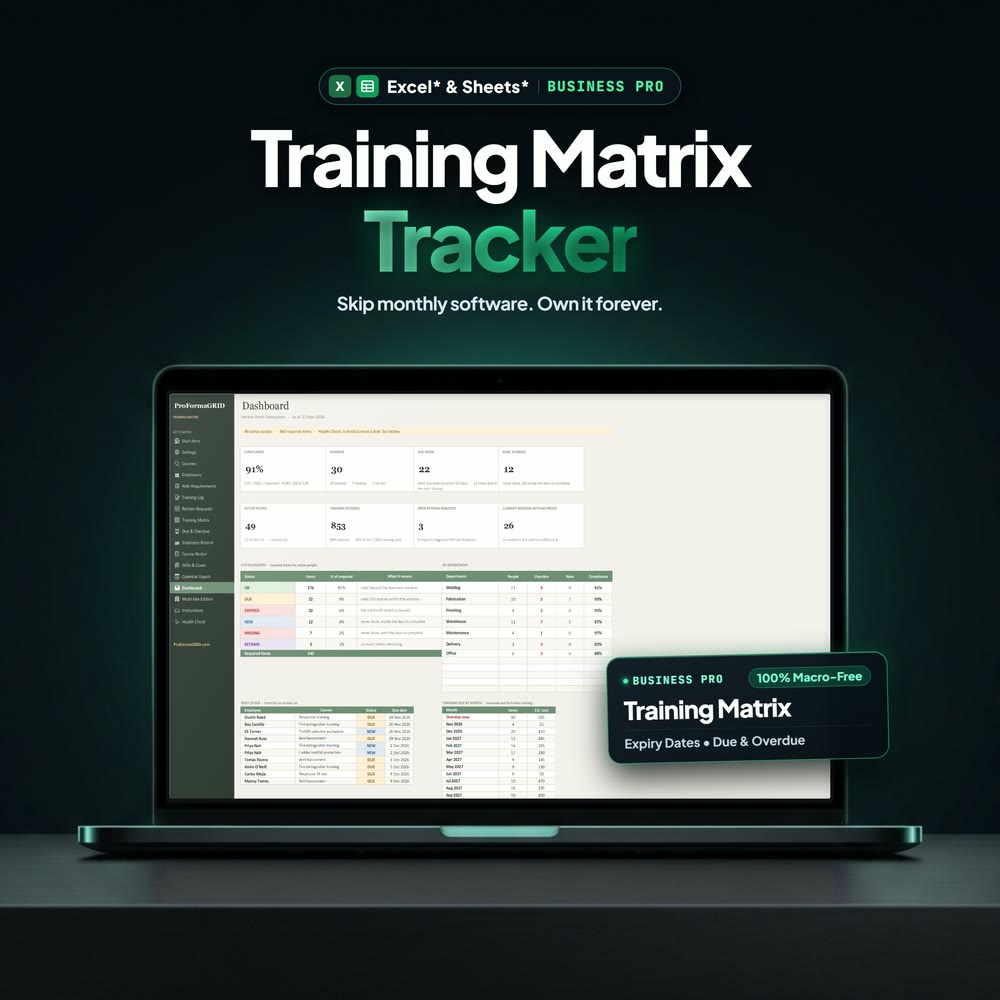
Small team editionUp to 60 people · Training Matrix Tracker$14.99Multi-site editionUp to 15 sites$59.99
$59.99USD
One-time paymentDigital download

Excel* & Google Sheets*

  • About 360 people at 10 required courses each, 15 sites, 120 courses and 8,000 training records
  • Requirement profiles by role, site and duty, with exemptions and retraining triggers
  • Compliance by site, department and manager, and a printable action list for each manager
  • Sessions with sign-ups, sign-in sheets, employee transcripts and cost by site
Explore the workbook ↓

Why you'll love working in this template

Set up your sites, status rules and budget on Org Setup, your courses on Courses and the courses each role or site needs on Requirement Profiles. Add your people on Employees and log completions on Training Log. Plan sessions and print sign-in sheets. Each week, give each manager their action list and check the Dashboard.

Jump to any worksheet

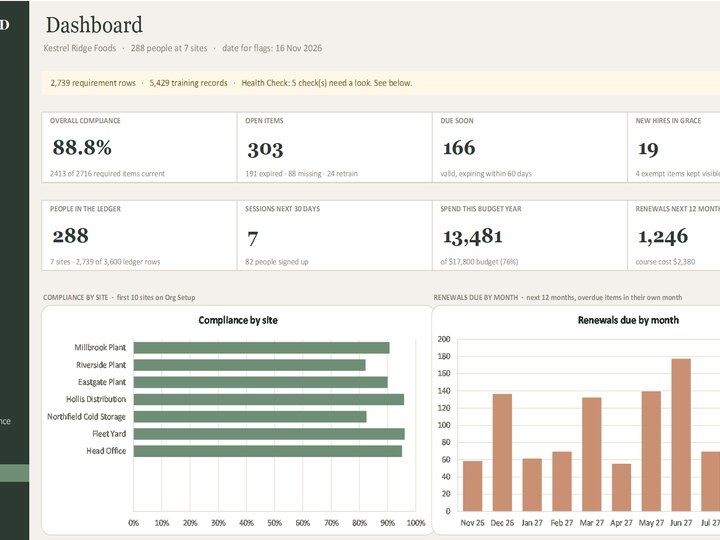
01 Dashboard

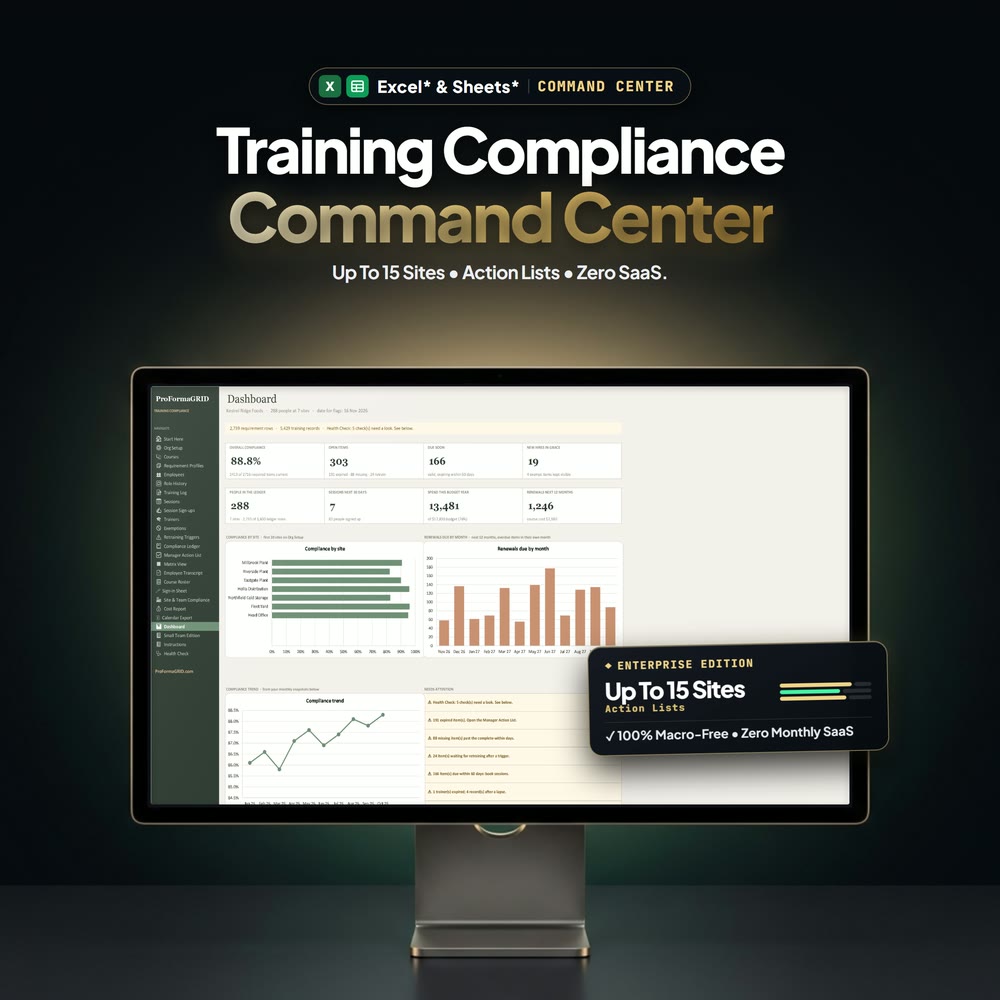
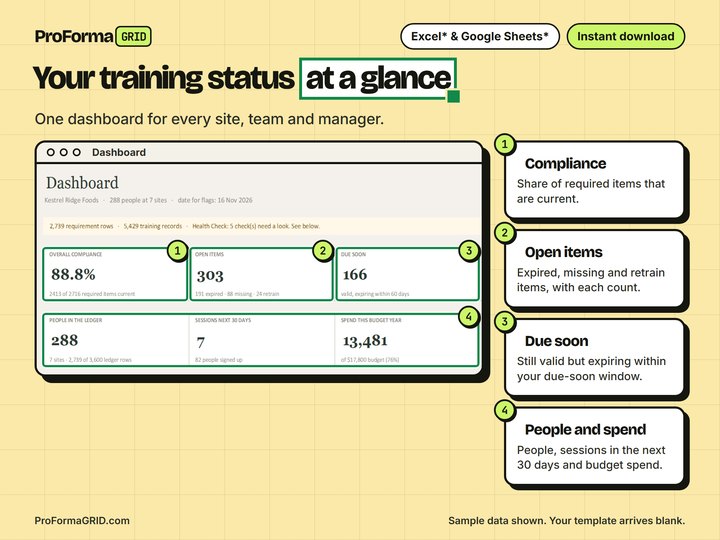
The whole company on one page

Overall compliance, open items, due soon, new hires in grace, sessions, spend and renewals, with compliance by site, renewals by month, a compliance trend and a needs-attention list.

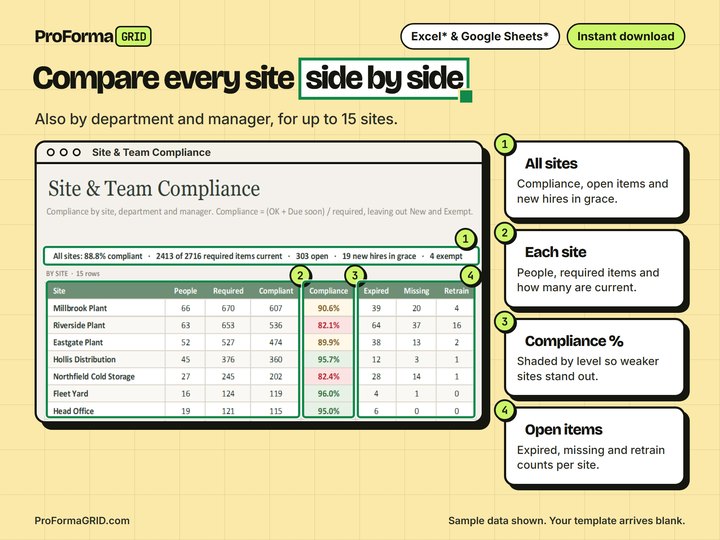
02 Site & Team Compliance

Compliance by site, department and manager

People, required items, compliant items and compliance % for every site, department and manager, with expired, missing and retrain counts.

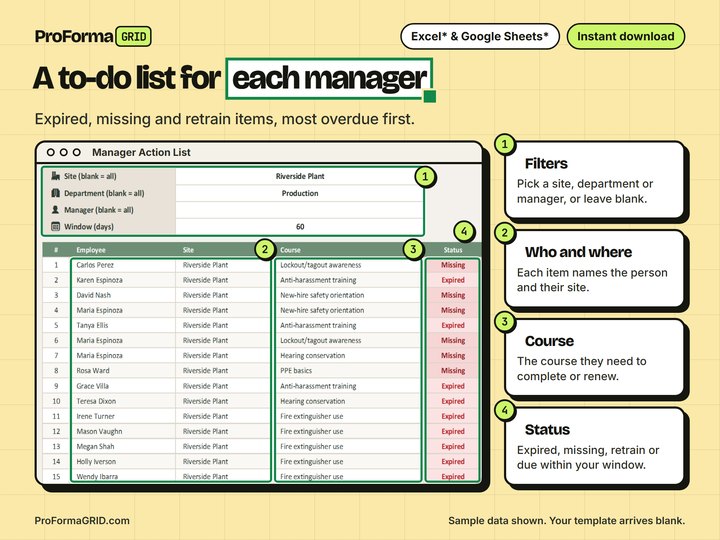
03 Manager Action List

A to-do list for every manager

Pick a site, department or manager to list what is expired, missing, waiting for retraining or due within your window, most overdue first, ready to print or copy into an email.

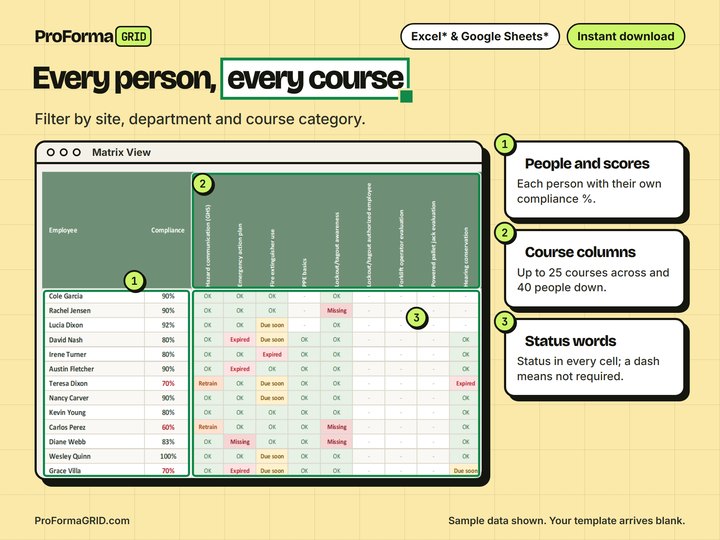
04 Matrix View

The classic matrix, filtered

Pick a site, department and course category to see up to 40 people by 25 courses with status words and each person's compliance.

Training Compliance Command Center, screen by screen

$59.99USD

Inside the workbook

25 pre-built, interconnected worksheets included in both Excel* and Google Sheets*.

  • Start Here
  • Org Setup
  • Courses
  • Requirement Profiles
  • Employees
  • Role History
  • Training Log
  • Sessions
  • Session Sign-ups
  • Trainers
  • Exemptions
  • Retraining Triggers
  • Compliance Ledger
  • Manager Action List
  • Matrix View
  • Employee Transcript
  • Course Roster
  • Sign-in Sheet
  • Site & Team Compliance
  • Cost Report
  • Calendar Export
  • Dashboard
  • Small Team Edition
  • Instructions
  • Health Check

Everything included in your download

Excel* & Google Sheets* digital bundle — ready for instant use

  • TrainingComplianceCommandCenter-Excel.xlsx
  • GoogleSheetsDownloadLink.pdf
  • Instructions.pdf

Instant digital download: your Microsoft Excel* (.xlsx) workbook, a one-click Google Sheets* copy link PDF and a step-by-step instructions PDF.

$59.99USD

Frequently asked questions

Contact support ↗
How many people and sites does it hold?

Up to 500 employee rows (leavers included) and 3,600 person-and-course requirement rows, which is about 360 people at 10 required courses each, plus 15 sites, 30 departments, 60 managers, 120 courses and 8,000 training records in one file.

Does it know the legal training requirements?

No. You type which courses each role and site needs and how long each stays valid. The sample file shows example courses and intervals; check the rules that apply to your business.

Does it send reminders?

No. It prints action lists and exports due dates for your calendar. It does not send emails.

Is there a version for one small team?

Yes. The Training Matrix Tracker covers up to 60 people in one place with a training matrix, expiry dates, a training log and a due and overdue list. The Small Team Edition tab inside this workbook shows it.

What spreadsheet software does the Training Compliance Command Center work with?

The Training Compliance Command Center includes ready-to-use files for both Excel & Google Sheets. Every formula, chart, dashboard, and all 25 connected worksheets (Start Here, Org Setup, Courses, Requirement Profiles, Employees, Role History, Training Log, Sessions, Session Sign-ups, Trainers, Exemptions, Retraining Triggers, Compliance Ledger, Manager Action List, Matrix View, Employee Transcript, Course Roster, Sign-in Sheet, Site & Team Compliance, Cost Report, Calendar Export, Dashboard, Small Team Edition, Instructions, Health Check) are pre-built and ready the moment you open your file.

Who is the Training Compliance Command Center built for?

Professionals, business owners, and individuals looking for a ready-to-use training compliance command center in Microsoft Excel and Google Sheets. Set up your sites, status rules and budget on Org Setup, your courses on Courses and the courses each role or site needs on Requirement Profiles. Add your people on Employees and log completions on Training Log. Plan sessions and print sign-in sheets. Each week, give each manager their action list and check the Dashboard.

Is the Training Compliance Command Center a one-time purchase or a subscription?

It is a 100% one-time purchase ($59.99 USD) with lifetime personal or internal business use — zero recurring subscription fees, zero locked cells, and no add-ons required.

How fast do I receive my files after checkout?

Immediately. Your download links appear right on your private order confirmation page seconds after checkout via credit card, Apple Pay, or Google Pay. Bookmark your order page to re-download anytime.
Purchase information ↗

Training Compliance Command Center

$59.99USD

Excel*, Google Sheets* and YouTube* are trademarks of their respective owners.

Related templates

Zoom in to read the details. Drag to move.