Free Canva invoice template. Look professional, get paid.
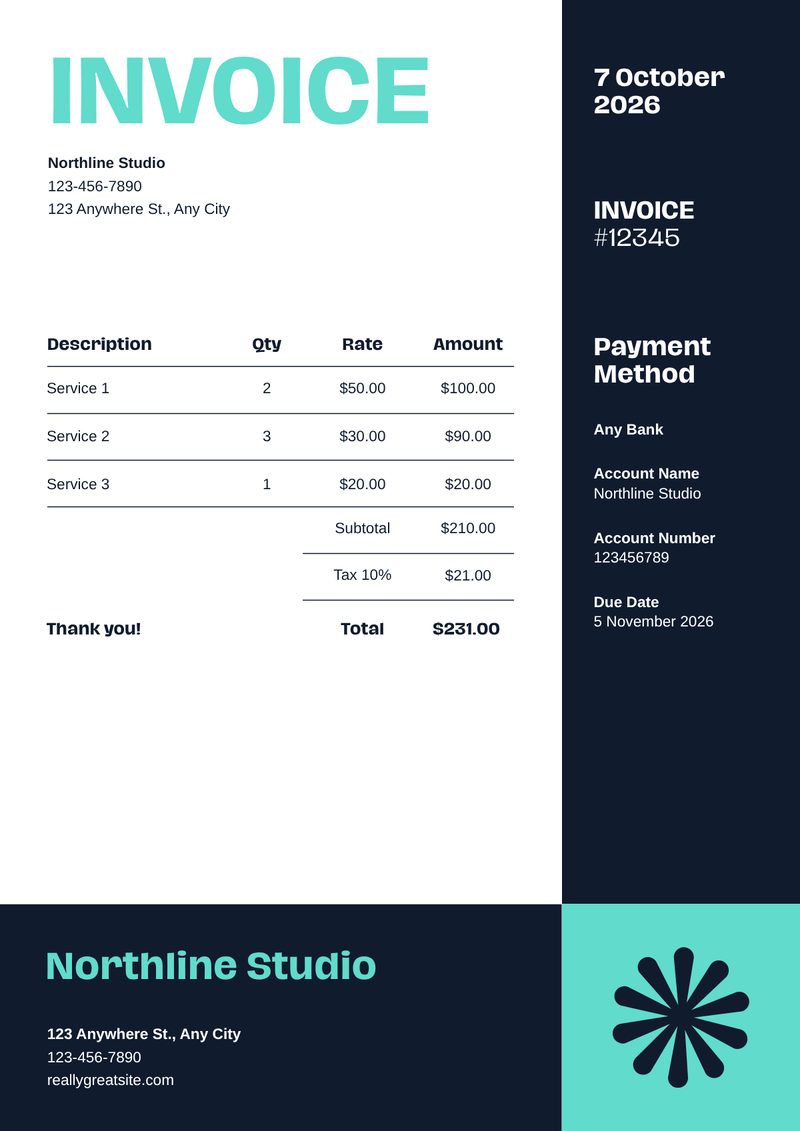
A clean, professional invoice with an itemized table, tax line, total due, and payment details. Fill it in Canva for each client and download a PDF.
Create a free account
One free account unlocks every template. Just an email and a password.
Your template is ready
Signed in as ·
Edit free in Canva ↗ Download printable PDFThe editable Canva version is coming soon. The PDF is ready to print now.
What's included
- Invoice layout with logo area, bill-to block, invoice number, and dates
- Itemized table with subtotal, tax, and total due
- Printable PDF version
How to edit it in Canva
- Unlock the template. Create a free account or log in above.
- Open it in Canva. Click Use template to copy it into your free account.
- Make it yours. Add your logo and business details once, then duplicate the page for each new invoice.
Questions
Is this canva invoice template really free?
Yes. It is free for personal and business use. Create a free account with your email and a password to download. There is no payment and no trial.
Do I need Canva Pro?
No. The template works with a free Canva account. Swap the text, colors, and photos, then download or print.
Can I print it?
Yes. The PDF is A4 (8.3 x 11.7 in), 1 page. Print at home or send it to a print shop.
Does Canva calculate the totals?
No. Canva is a design tool, so type the amounts in yourself. For automatic totals, use a spreadsheet invoice.